Style
Style is where you set how a form looks and what it says first. Every form has one: the Bubble, the Bar, the Support page and Your page on hiy.ai.
Open a form’s Style
Open a form in Channels: Style is its first tab. Changes show in the live preview beside it; on a phone, switch between Edit and Preview. Preview size shows it on a computer or a phone, and conversations in the preview are private.


Look from
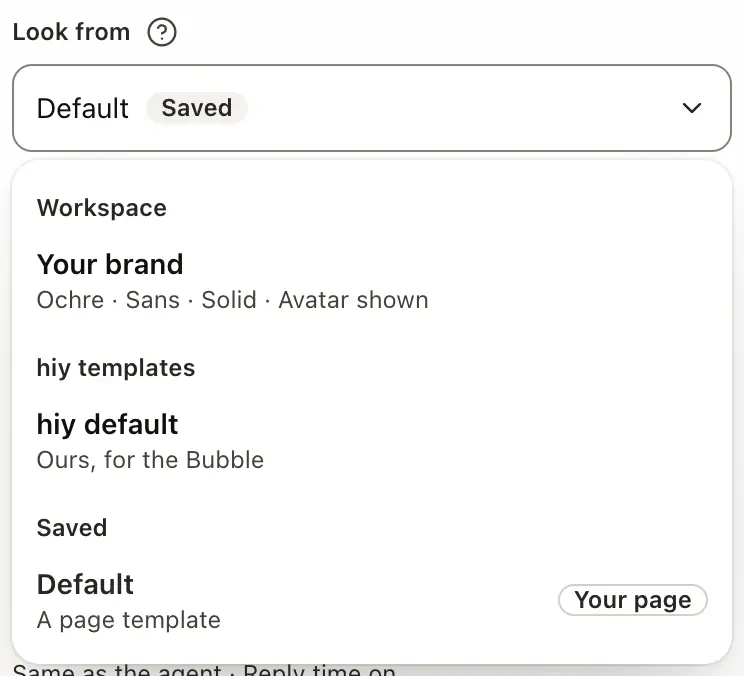
Look from, at the top, says where this form’s look starts:
- Your brand: your workspace’s look, set in Templates.
- hiy templates: our own starting look, hiy default.
- Saved: a template your workspace saved.
What you change on top stays this agent’s and is marked Edited here; Reset clears it. Save as template keeps this form’s look to use on other agents.
What each section holds
Style has up to six sections: Template, Look (colour, type, surface, shape and branding), Layout, Welcome, Chat, and Card on Your page. Each form shows only what applies to it, and a control new to a form says New here.
Colour
Default is our ink. Pick one of six colours, or Your colour for any colour: text and links switch to ink where it is too light to read. It reaches Send, links and the focus ring, and the Bubble’s launcher. On the Bubble, copy the snippet again after a change (Launcher colour).
Light or dark
Match device follows each visitor’s own setting. Light or Dark fixes it for everyone.
Greeting and starting points
Under Welcome, Same as the agent uses the greeting and suggested questions set on your agent. Switch it off to give this form its own greeting and up to three starting points.
Language
Under Chat, Language sets the chat’s own buttons, tabs and help text: Visitor’s language follows each browser, or fix one of seven. Your greeting and starting questions show exactly as you wrote them.
Your privacy link
Your privacy link adds your own privacy page to the chat’s menu, beside ours.
Save draft and Publish
Save draft keeps your changes private: visitors still see the published version. Publish makes them live from each visitor’s next visit.
Good to know
- Style is part of the new Channels layout, rolling out to workspaces in turn.
- Some controls, such as Opens on and Language, come with the new widget look.
- Only an owner or admin can change Your brand and saved templates; an agent’s own form, its owner or an admin.
- Your agent’s name, photo, bio and links stay in its Profile, and what it answers in its Settings.
Related
Your brand, hiy’s templates and the looks you save, shared across agents.
Put your agent on your website as a Bubble, a Bar or a Support page.
An Expert Twin’s or Team Agent’s own page: its look, card and address.
The snippet, sizing, allowed websites, and tokens from your own server.